
Halfway through a Bare Metal Recovery (BMR), at the point where you pick the backup server, the wizard stops with Error trying to validate NetWorker Server credentials: No response from server. The name resolves, the server is up, other backups are running. The message is misleading: this is almost never a network problem and almost never a password problem — the check that fails is the mutual certificate check behind NetWorker Server credentials, and the fix is to delete one stale resource.
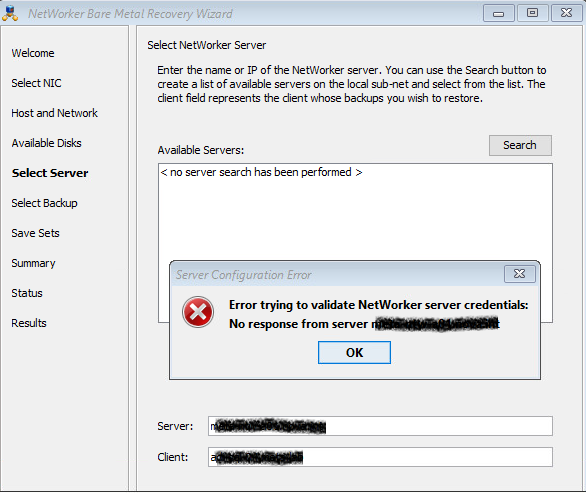
What the NetWorker Server credentials check actually does
NetWorker's default authentication mode is nsrauth, a mutual, certificate-based handshake between nsrexecd on the two hosts. Each side keeps a record of the other in an NSR peer information resource: the peer hostname, its NetWorker instance ID and its certificate.
When the wizard validates NetWorker Server credentials it is not sending a user name and a password anywhere. It opens an nsrauth session, the server presents the certificate it has on file for the host it thinks it is talking to, the two do not match, and the session is dropped. What surfaces in the GUI is a generic timeout: No response from server.
The mismatch has a mundane cause. The instance ID and certificate are generated once, at install time, and stored on disk. Anything that gives a host a new identity under the same name breaks the pairing:
- a rebuilt or reinstalled machine — which is exactly what a Bare Metal Recovery is;
- a virtual machine restored from a template or cloned and renamed;
- a NetWorker agent reinstalled after the local database was wiped;
- a hostname reused for different hardware.
The misleading part: "No response from server"
Before touching anything, rule out the boring causes — but do not spend an hour there, because all of them will look healthy:
# forward and reverse must agree, both ways, on both hosts
nslookup rocky-a01
nslookup 192.168.10.25

# the documented service port range is 7937-9936; nsrexecd listens inside it
rpcinfo -p rocky-a01
nsrports -s rocky-a01
NetWorker is unusually strict about name resolution, so it is worth getting this right rather than approximately right; if the resolver list itself is wrong on a batch of machines, updating the DNS servers remotely with PsExec is the fastest way to correct it. If DNS is consistent and the service ports answer, the transport is fine. "No response from server" is what a rejected nsrauth handshake looks like from the outside: the wizard reports a timeout rather than an authentication failure, which sends you off to check a firewall that was never the problem. That is the whole trap in this error message.
Delete the stale NSR peer information resource
Run this on the NetWorker server, against the local nsrexecd:
nsradmin -p nsrexec
NetWorker administration program.
Use the "help" command for help, "visual" for full-screen mode.
nsradmin> delete type:nsr peer information;name:<Client_name>
                        type: NSR peer information;
               administrator: Administrators,
                              "group=Administrators,host=<NetWorker_server_name>";
                        name: <Client_name>;
               peer hostname: <Client_name>;
          Change certificate: ;
    certificate file to load: ;
Delete? y
deleted resource id 1.0.xxx.xx.xxx.xxx.0.0.xx.xx.x.xx.xxx.xxx.xxx.xxx(1)
nsradmin> quit
Replace <Client_name> with the host name exactly as NetWorker knows it. The record is not configuration — it is a cached identity. The next time the two hosts talk, nsrexecd recreates it from the certificate that is actually presented, and the handshake succeeds.
To see what is there before you delete anything:
nsradmin -p nsrexec
nsradmin> show name; peer hostname
nsradmin> print type: NSR peer information
Clear peer information mismatches automatically
Deleting records by hand does not scale past a couple of hosts. Dell documents a built-in validation mode for exactly this, in KB 000022820:
# report every peer whose instance ID or certificate no longer matches
nsradmin -p nsrexecd -C "NSR peer information"

# clear the mismatched ones without prompting
nsradmin -p nsrexecd -C -y "NSR peer information"
The -C option compares the NetWorker instance ID and certificate attributes between the two databases and reports the ones that disagree. Run it without -y first and read the list.
One caveat, and it is Dell's own: clearing peer information weakens the identity check for as long as the record is missing. If a rogue machine holding the same name and address is on the network while the legitimate host is powered off, it can be the one that registers the new certificate. Clear the records when you know why they are stale — after a rebuild you performed — not as a routine cleanup.
If the error comes back: clear it on the other side too
Peer information is stored on both hosts. A recovered machine also keeps a record of the backup server, and if that one is stale you get the same symptom in the opposite direction. Repeat the same steps on the recovered host:
nsradmin -p nsrexec
nsradmin> delete type:nsr peer information;name:<NetWorker_server_name>
On a NetWorker server with a separate Authentication Service or a storage node in the path, do the same wherever nsrauth errors show up in the daemon log.
Verify
# from the recovered host, against the backup server
nsradmin -p nsrexec -s <NetWorker_server_name>

# and read the handshake in the daemon log
nsr_render_log /nsr/logs/daemon.raw | tail -20
/nsr/logs/daemon.raw is stored unrendered, which is why it goes through nsr_render_log rather than tail -f — reading the file directly gives you the raw records. If nsradmin connects and returns a prompt, the pairing is rebuilt. Go back to the Bare Metal Recovery wizard, select the server again, and the backup list will browse normally.
It is not only a BMR problem
The same fix applies whenever a host was rebuilt or cloned under a name NetWorker already knew: failed save sets with authentication errors in daemon.raw, an nsrexecd that refuses a probe, a recovery that cannot list save sets. If the symptom appeared right after a reinstall, restore or clone, check the NSR peer information resource first — it is a thirty-second check that saves a long look at the firewall.
